This blog contains affiliate links. Guided Wellness is a customer of Gusto Payroll, a company which offers a referral program that benefits new customers and current referring customers. Guided Wellness will earn a small commission from Gusto Payroll, at no cost to you, if you purchase through these links. I am careful to link only to products I use for myself or my business and can enthusiastically recommend.
Running Payroll For Your Therapy Private Practice
Private practice therapists are endlessly diverse. We come from a variety of backgrounds, serve a range of clientele with diverse needs and we specialize in various applications and forms of service. But something that unites us? Most of us don’t have a background in business. Yet here you are, reading a blog about how to pay your team.
When I expanded my therapy practice from a solo operation to a group private practice I had a lot to learn. But since I wasn’t planning on growing a huge team (I wanted to hire just 1 or 2 clinicians) I worried that some systems, like payroll, would be wildly complicated. I even wondered, do I really need payroll if I have just 2 employees?
A coach I worked with pointed me towards Gusto. And since signing up I’ve never looked back. Forty-eight payrolls later I’ve streamlined my system for running payroll for my private practice with Gusto in combination with Therapy Notes to easily pay my team. I never worry about miscalculating their hours, under or over paying or missing a paycheck. Gusto payroll has it all figured out. And if you use Therapy Notes as your EHR you are perfectly set up to run payroll for your private practice in 5 easy steps.

SAVE $100 WHEN YOU SIGN UP FOR GUSTO
How Therapy Group Practice Owners Use Gusto and Therapy Notes
In short, here are the 5 easy steps I use to run payroll with Gusto and Therapy Notes for error-free reporting:
- Open Your Gusto Email: “It’s time to approve your team’s hours!”
- Step 2: Sign Into Therapy Notes > Billing
- Step 3: Run A Billing Report In Therapy Notes
- Step 4: Repeat For Each Clinician
- Step 5: Report these hours in Gusto and you’re done!
Now, some of you are visual learners like me. And some of you want this spelled out in detail. I don’t blame you. Signing up for a payroll program can feel like an overwhelming decision and you want to make sure you choose a system that’s going to work for you without any hassle or too many complicated bells and whistles.
With that in mind, I’m going to walk you through my real-life five easy steps for running payroll for my therapy private practice team using Gusto payroll and Therapy Notes. Are you ready to go behind the scenes? Let’s do this.
Step 1: Open Your Gusto Email:
“It’s time to approve your team’s hours!”
Several days before payroll is due Gusto sends an email reminding me that it’s time for me to log hours and run payroll for my private practice team. You can’t miss this email from Gusto – it’s literally titled, “It’s time to approve your team’s hours!” And if you don’t do it the same day as this email they will follow it up with a reminder almost every day till you do.
I cannot begin to tell you how many times this email has saved my butt. Honestly, without these email reminders from Gusto I would have missed running payroll for my therapy practice dozens of times. These email reminders are not just helpful, they are a critical part of my systems and ensure I am running payroll on time.
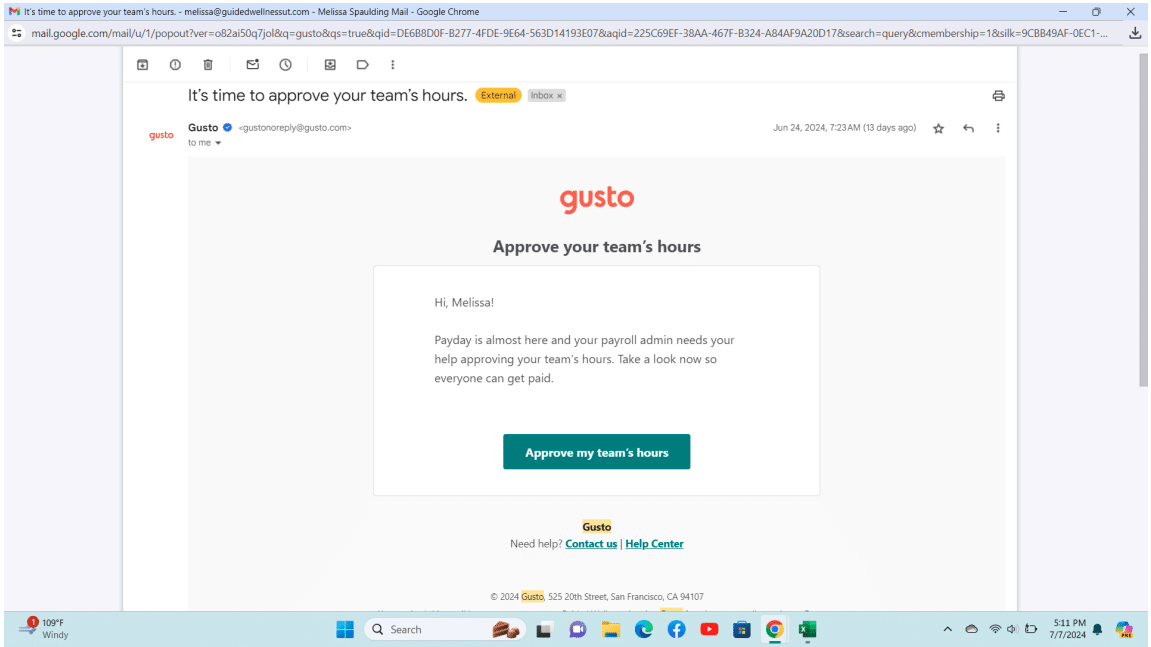
For Step 1, I’ll open the email and click the button APPROVE MY TEAM’S HOURS. It will take me to my Gusto account for sign-in and open up to the “Run Payroll” page.
This Gusto page will tell me exactly what dates I’m running payroll for. Let’s imagine in this scenario I’m running payroll for the dates of my last actual pay period: June 9th – June 23rd.
SIGN UP YOUR GROUP PRACTICE TODAY
Step 2: Sign Into Therapy Notes > Billing
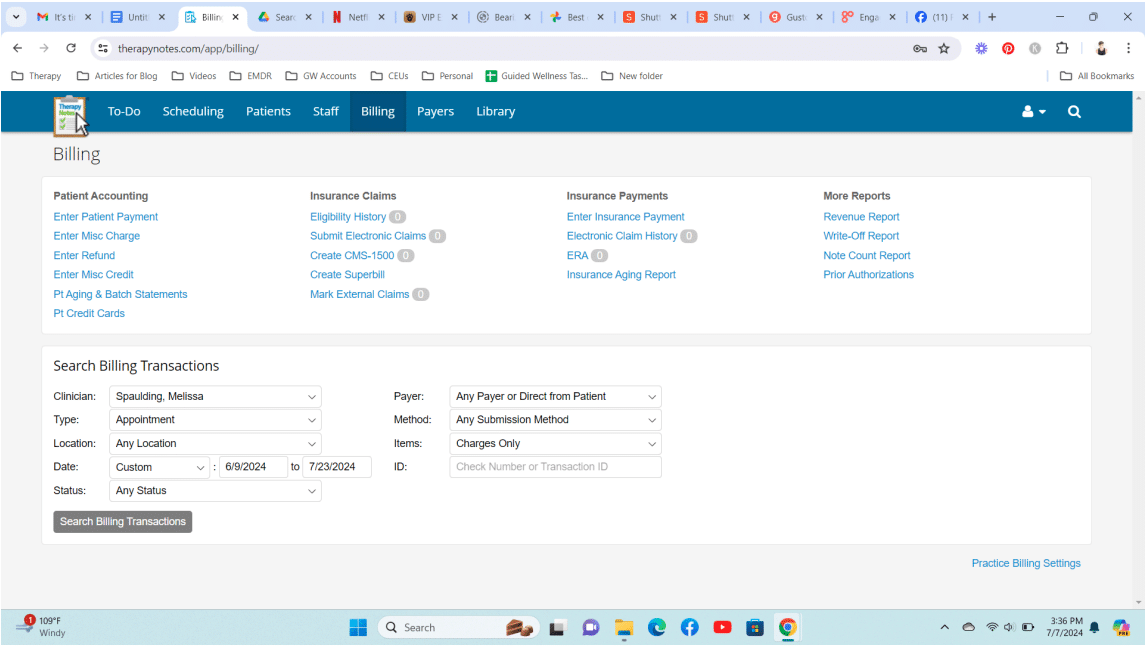
Okay, now I open a second tab on my laptop and sign in to Therapy Notes. From there, I’ll hop over to the BILLING page. This is where I’ll discover exactly how many hours each of my private practice clinicians worked this payroll period.
Step 3: Run A Billing Report In Therapy Notes
Here’s where the magic happens. For context, you may need to know two things. First, my therapy private practice is patient-pay. This means I do not have to factor in anything having to do with insurance payments or reimbursements. Our client’s come to their therapy session, we charge their card for payment (using Therapy Notes as our payment processor) and that’s the end of the story.
Second, my private practice clinicians are W-2 employees and are only paid for clients who actually show up for sessions or who have a no-show / late-cancel fee charged.
Alright, now that we are in the BILLING tab of TherapyNotes I do the following for each clinician in the SEARCH BILLING TRANSACTIONS box:
- Select Clinician: Choose 1 clinician on your team [e.g Spaulding, Melissa]
- Billing Type: APPOINTMENT
- Location: ANY
- Date: CUSTOM [i.e. in this example we’re using the period 6/9 – 6/23/24]
- Status: ANY STATUS
- Click “SEARCH BILLING TRANSACTIONS” [gray button]
Step 4: Export Spreadsheet To Count Your Hours
Now that you’ve clicked SEARCH BILLING TRANSACTIONS a table will appear that lists all the clients your clinician has seen in that payroll period. If you wanted to manually count these sessions, you could. But I recommend you let Excel do the counting for you! Let’s do that now.
At the top right of this report box you’ll click the button EXPORT SPREADSHEET.
Low and behold, an Excel spreadsheet will open with all the sessions done by this clinician. Simply look at the number line on the left-hand side of the page and subtract 1 (because row number 1 is the Excel form header). In this example, you can see that I did 11 sessions.
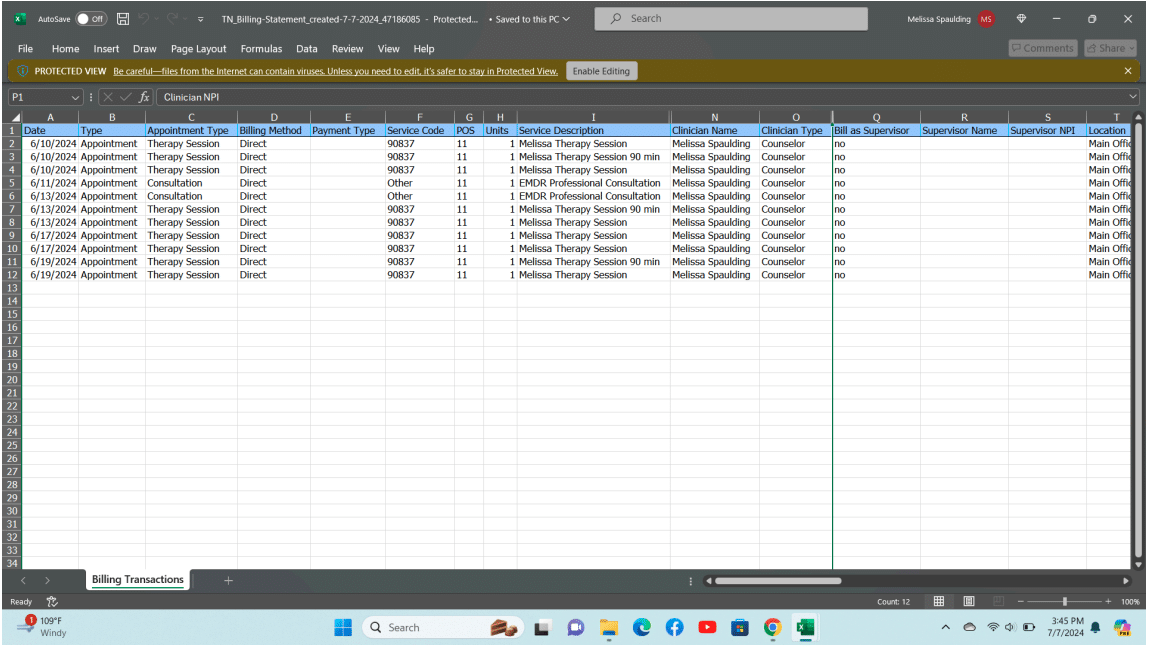
**Patient name, DOB and my NPI number have been removed from the form**
Step 4: Repeat For Each Therapist In Your Private Practice
Now you’ll run this same Therapy Notes > Search Billing Transactions report for each clinician.
In real life, I have two more clinicians on the team at Guided Wellness Counseling. Let’s call them Blanche Devereaux and Dorothy Zbornak. To repeat this process for each clinician I would simply:
- go back to Therapy Notes > Search Billing Transactions and change the selected clinician to Blanche Devereaux
- press the SEARCH BILLING TRANSACTIONS button
- then EXPORT SPREADSHEET
- and count the hours on the spreadsheet.
I would repeat the process for my second clinician, Dorothy Zbornak: change the clinician name to Dorothy Zbornak, press the SEARCH BILLING TRANSACTIONS button, then EXPORT SPREADSHEET and count the hours on the spreadsheet.
Step 5: Report these hours in Gusto and you’re done!
Congratulations! You just figured out how many hours each clinician at your private practice will be paid. Now, we’ll go back to your Gusto account and enter this information.
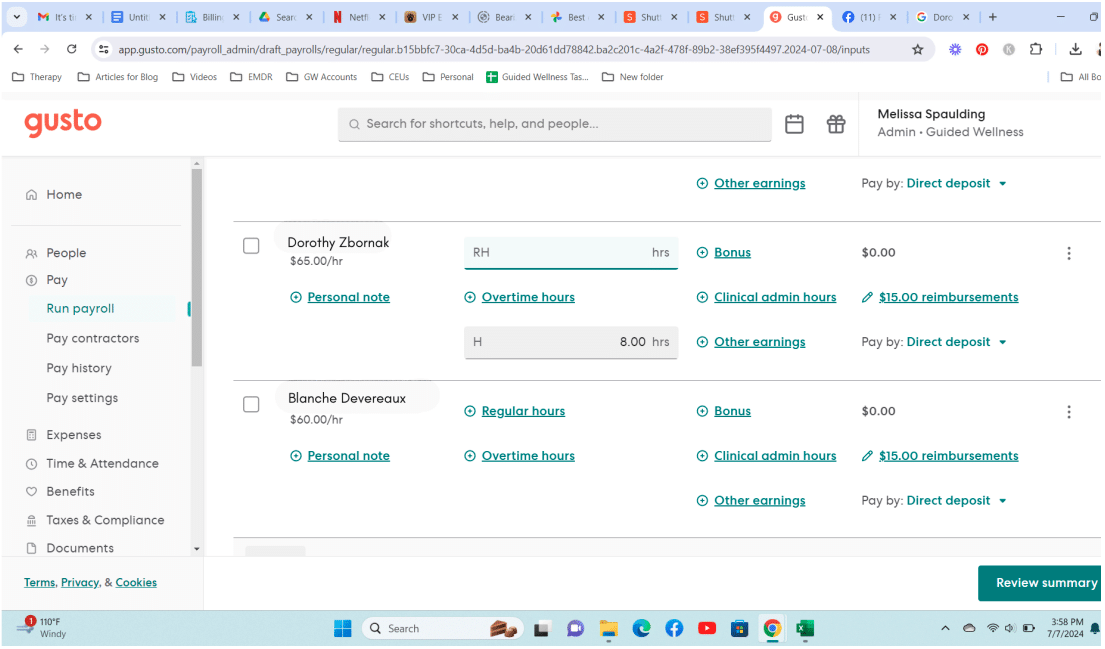
Currently, Gusto uses a spreadsheet format to collect the hours. If you like this format, great! I prefer their alternative layout which you can view by clicking the SPREADSHEET toggle button on the right side of the page. This decision is purely based on your visual comfort for various formats.
I enter the number of hours the clinician worked into the box labeled REGULAR HOURS (RH).
Click the REVIEW SUMMARY button in the lower right corner to double check your work before you submit it to Gusto. And that’s it!
Private Practice Owners Can Customize Gusto Payroll
This could be the end of payroll for you. But, a great feature of Gusto is that it lets you customize your account as much or as little as you need for your therapy private practice. For example, Gusto payroll lets you customize other items, services or rates you may be offering your therapy group or team. You can set up these items when you create your account and/or edit them at any time as your private therapy practice grows, changes or as you add therapists to your group.
CLAIM $100 OFF GUSTO FOR PRACTICE OWNERS
As an example, here are a few other things I have pre-set in Gusto for my therapy practice:
- $15 tech “Reimbursement”: this is a perk I offer my employees as I do not provide them with workplace computers or phones. This reimbursement is automated in Gusto payroll to show up on every paycheck.
- Clinical Admin Hours: I use this fee setting 1x a month to pay my employees for their administrative time. My employees report their administrative time to me at the end of each month and I enter those hours here. I allow them to include time spent in administrative meetings, clinical team meetings and marketing.
- Bonus: my clinicians make an additional bonus (approximately $20) for each 90 minute session they perform. When I look at their Excel spreadsheet I check for 90 minute sessions and then enter it in Gusto payroll. For example, if I see that they did three 90 minute sessions I add $60 (3 x [$20 per 90 minute session]) in the “Bonus” area of the Gusto payroll report.
- Salary: as the owner of the practice I pay myself on salary. This means that my paycheck is the same every single payroll period no matter how many clients I see. As the owner of the therapy practice, most of my time these days is spent in marketing, training and administrative tasks. When I set up my Gusto payroll account for the private practice I entered what I wanted my paycheck to be and it repeats itself in every payroll report.
In the past, I also offered Holiday Pay for my full-time private practice employees and I loved that Gusto allowed me to select which holidays I wanted to cover, if not all of them.
In the future, Guided Wellness Counseling will be in-network with a health insurance panel. My clinicians will be paid a different rate for seeing clients on this panel. When we are finally accepted as in-network and begin seeing insurance clients I will return to Gusto and set up a second “Earning Type” to record these insurance hours and their unique pay rate.
Do You Need Payroll For Your Group Private Practice?
Being the owner of a private practice is a big responsibility. There are a lot of questions you will need to answer. How many clinicians do you want to hire? Will they share your specialty or will you diversify your offerings? What will their rate be? How much will you pay them? And how will you pay them?
The answers to the first four questions will be unique to your and your vision for the group. But the last question – how will you pay them? – that’s one I can confidently answer. Gusto has been the easiest payroll experience I’ve had. Plain and simple. From their user-friendly interface to amazing customer service, I have no complaints. And the simplicity of running billing transactions on Therapy Notes makes reporting hours on Gusto payroll a breeze. I never worry that I’ve miscounted hours or shorted a clinician on their hard work.
If you are ready to begin, you can sign up for Gusto today and receive a $100 Visa gift card when you run your first payroll. Simply use the button above to use my affiliate discount and never worry about missing or miscalculating payroll ever again. From one private practice owner to another, I wish you and your clinicians every success as you serve your endlessly diverse and complex clientele. May we all find good mental and emotional health!